PIXNET Logo登入

程式狂想曲

跳到主文

這裡是程式的筆記,與對未來的狂想 分享,是學習的開始~

部落格全站分類:數位生活

  • 相簿
  • 部落格
  • 留言
  • 名片
  • 1月 15 週四 201508:34
  • Halcon 3D (三) 相機校正會用到的參數(一隻相機)

 
建立校正資料開始:
create_calib_data( : : CalibSetup, NumCameras, NumCalibObjects : CalibDataID)
  CalibSetup:校正模式
  NumCameras:相機數量
  NumCalibObjects:校正版數量
  CalibDataID:校正資料ID
(繼續閱讀...)
文章標籤

Rh 發表在 痞客邦 留言(0) 人氣(994)

  • 個人分類:影像處理
▲top
  • 1月 14 週三 201514:13
  • Halcon 3D (二) 相機校正

適用  Area Camera, 使用 CCTV 鏡頭

CalPath := 'C:/Program Files/MVTec/HALCON-12.0/calib/自建/calplate_big.cpd' '校正版檔案路徑
StartCamPar := [0.016,0,0.0000074,0.0000074,320,240,640,480] '相機初始參數
(繼續閱讀...)
文章標籤

Rh 發表在 痞客邦 留言(0) 人氣(664)

  • 個人分類:影像處理
▲top
  • 12月 08 週一 201413:51
  • Halcon 3D (一) 相機校正

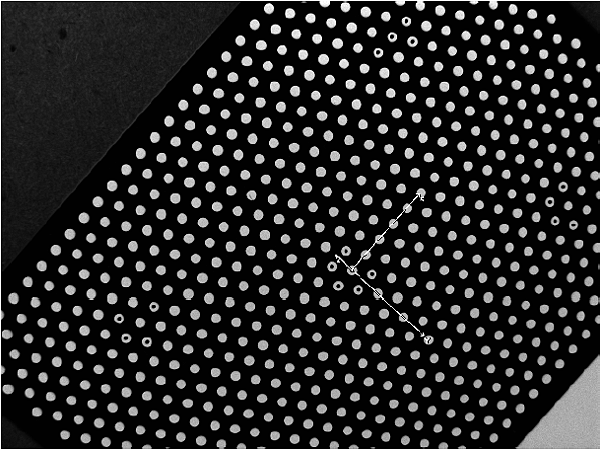
calibration plates with hexagonally arranged marks
Halcon 在3D 模組使用前需要將相機做參數校正
首先 需要設定 要使用的相機組成(CameraType)  與 相機與鏡頭的參數(CameraPAram)
 
CameraType 這邊參考 Halcon 的文件 選擇 合適的 Type
(繼續閱讀...)
文章標籤

Rh 發表在 痞客邦 留言(1) 人氣(2,225)

  • 個人分類:影像處理
▲top
  • 12月 02 週二 201423:46
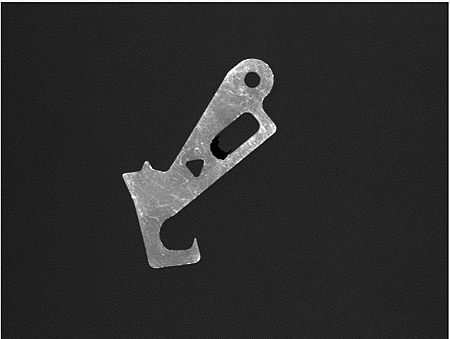
  • 型態學 方型尋找

1
* Image Acquisition 01: Code generated by Image Acquisition 01
list_files ('D:/Study/鐵片方型尋找', ['files','follow_links'], ImageFiles)
tuple_regexp_select (ImageFiles, ['\\.(tif|tiff|gif|bmp|jpg|jpeg|jp2|png|pcx|pgm|ppm|pbm|xwd|ima|hobj)$','ignore_case'], ImageFiles)
for Index := 0 to |ImageFiles| - 1 by 1
    read_image (Image, ImageFiles[Index])
    rgb1_to_gray(Image, GrayImage)
    intensity(Image,GrayImage,Mean, Deviation)
    threshold(GrayImage,Region,0,Mean+Deviation*0.5)
    difference(GrayImage,Region,diffReg)
    fill_up(diffReg, RegionFillUp)
    reduce_domain(GrayImage, RegionFillUp, ImageReduced)
    threshold(ImageReduced,Region2,0,Mean)
    fill_up(Region2, RegionFillUp1)
    boundary(RegionFillUp1, RegionBorder, 'inner')
    connection(RegionBorder, ConnectedRegions)
    select_shape(ConnectedRegions,SelectedRegions,'contlength','and',190, 250)
    count_obj(SelectedRegions, Number)
    if (Number > 0)
        dev_display(GrayImage)
        for index := 1 to Number by 1
              select_obj(SelectedRegions, ObjectSelected, index)
              gen_contour_region_xld(ObjectSelected,Contours, 'border')
              shape_trans_xld(Contours,XLDTrans,'rectangle2')
              smallest_rectangle2_xld (XLDTrans, Row, Col, Phi, Len1, Len2)
              tuple_sin (Phi, Sin)
              tuple_cos (Phi, Cos)
              * 四点中心坐标 左,右,上,下
              L_Row := Row - (Len2 * Cos)
              L_Col := Col - (Len2 * Sin)
              B_Row := Row + (Len1 * Sin)
              B_Col := Col - (Len1 * Cos)
              T_Row := Row - (Len1 * Sin)
              T_Col := Col + (Len1 * Cos)
              R_Row := Row + (Len2 * Cos)
              R_Col := Col + (Len2 * Sin)
              gen_arrow_contour_xld (Arrow1, L_Row, L_Col, R_Row, R_Col, 1, 1)
              gen_arrow_contour_xld (Arrow2, B_Row, B_Col, T_Row, T_Col, 1, 1)
              gen_contour_polygon_xld (ContourL, [L_Row + 10 * Sin/2, L_Row - 10 * Sin/2], [L_Col - 10 * Cos/2, L_Col + 10 * Cos/2])
              gen_contour_polygon_xld (ContourR, [R_Row + 10 * Sin/2, R_Row - 10 * Sin/2], [R_Col - 10 * Cos/2, R_Col + 10 * Cos/2])
              gen_contour_polygon_xld (ContourT, [T_Row - 10 * Cos/2, T_Row + 10 * Cos/2], [T_Col - 10 * Sin/2, T_Col + 10 * Sin/2])
              gen_contour_polygon_xld (ContourB, [B_Row - 10 * Cos/2, B_Row + 10 * Cos/2], [B_Col - 10 * Sin/2, B_Col + 10 * Sin/2])
              dev_set_color ('blue')
              dev_display (Arrow1)
              dev_display (ContourL)
              dev_display (ContourR)
              dev_set_color ('green')
              dev_display (Arrow2)
              dev_display (ContourT)
              dev_display (ContourB)
              disp_message (3600, Len1 * 2, 'image', T_Row, T_Col, 'red', 'false')
              disp_message (3600, Len2 * 2, 'image', R_Row, R_Col, 'magenta', 'false')
             
             * dev_display(ObjectSelected)
              wait_seconds(1)
        endfor            
    endif    
endfor
(繼續閱讀...)
文章標籤

Rh 發表在 痞客邦 留言(0) 人氣(233)

  • 個人分類:影像處理
▲top
  • 11月 26 週三 201421:54
  • 同步網路硬碟資料夾 與 Hardlink 運用

Hard link 就是 建立A目錄 連接到  B目錄
例:
D:\ 沒有temp 的資料夾    
mklink /j  D:\temp C:\temp
(繼續閱讀...)
文章標籤

Rh 發表在 痞客邦 留言(0) 人氣(87)

  • 個人分類:電腦應用
▲top
  • 11月 26 週三 201419:07
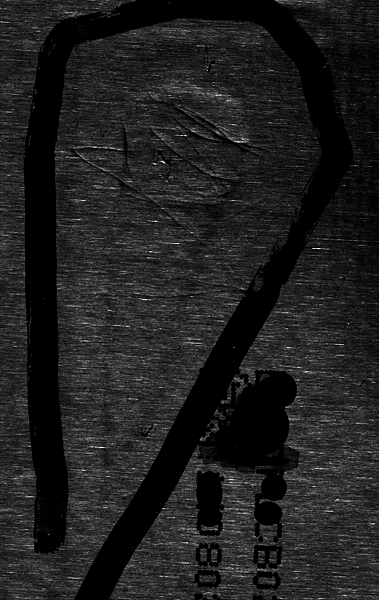
  • Halcon 尋找細線

尋照細線
 
Paste your text here.read_image (Image, 'CutImage.png')
rgb1_to_gray (Image, GrayImage)
get_image_size (GrayImage, Width, Height)
dev_close_window ()
dev_open_window (0, 0, Width, Height, 'black', WindowHandle)
dev_display (Image)
dev_set_draw ('margin')

*排除塗黑的區塊
mean_image (GrayImage, ImageMean, 50, 50)
threshold (ImageMean, RegionBlacked, 20, 255)
erosion_circle (RegionBlacked, RegionBlackedDilation, 20.5)
median_rect (GrayImage, ImageMedian, 1, 5)

*方法:提取線
lines_gauss (ImageMedian, Lines, 1, 2, 6, 'dark', 'true', 'bar-shaped', 'true')
union_collinear_contours_xld (Lines, UnionContours, 10, 1, 5, 0.4, 'attr_keep')
select_shape_xld (UnionContours, SelectedXLD, 'contlength', 'and', 40, 99999)
select_shape_xld (SelectedXLD, SelectedXLD1, 'anisometry_points', 'and', 10, 99999)
gen_region_contour_xld (SelectedXLD1, RegionLines, 'filled')
intersection (RegionLines, RegionBlackedDilation, RegionIntersection)
union1 (RegionIntersection, RegionUnion1)
closing_circle (RegionUnion1, RegionClosing, 3.5)
connection (RegionClosing, ConnectedRegions)
select_shape (ConnectedRegions, SelectedRegionsFinal, 'area', 'and', 75, 9999999)
union1 (SelectedRegionsFinal, RegionUnionFinal)

*方法:邊緣檢測後提取線
derivate_gauss (ImageMedian, DerivGauss, 1, 'gradient')
sobel_amp (ImageMedian, EdgeAmplitude, 'sum_abs', 5)
lines_gauss (EdgeAmplitude, Lines1, 1, 6, 15, 'light', 'true', 'bar-shaped', 'true')
union_collinear_contours_xld (Lines1, UnionContours1, 10, 1, 5, 0.4, 'attr_keep')
select_shape_xld (UnionContours1, SelectedXLD2, 'contlength', 'and', 40, 99999)
select_shape_xld (SelectedXLD2, SelectedXLD3, 'anisometry_points', 'and', 10, 99999)
gen_region_contour_xld (SelectedXLD3, RegionLines1, 'filled')
intersection (RegionLines1, RegionBlackedDilation, RegionIntersection1)
union1 (RegionIntersection1, RegionUnion2)
closing_circle (RegionUnion2, RegionClosing1, 3.5)
connection (RegionClosing1, ConnectedRegions1)
select_shape (ConnectedRegions1, SelectedRegionsFinal1, 'area', 'and', 75, 9999999)
union1 (SelectedRegionsFinal1, RegionUnionFinal1)

*結合兩種方法
union2 (RegionUnionFinal, RegionUnionFinal1, AllRegions)
dilation_circle (AllRegions, Defects, 6.5)

*可視化
dev_set_color ('red')
dev_display (Image)
dev_display (Defects)
(繼續閱讀...)
文章標籤

Rh 發表在 痞客邦 留言(0) 人氣(708)

  • 個人分類:
▲top
  • 9月 20 週六 201422:33
  • 如何雙開 VM 還可以很順暢

一直以來  進到一個誤區,為了讓VM可以跑得很順利 升級電腦  加大記憶體  到最近換了 SSD
的確,花了錢  開 VM的確順很多
但雙開 VM 還是會卡卡的。
最後發現  給予VM適當的RAM 大小很重要
(繼續閱讀...)
文章標籤

Rh 發表在 痞客邦 留言(1) 人氣(1,204)

  • 個人分類:
▲top
  • 9月 17 週三 201409:07
  • Datagridview Row Heade 設定文字 與 消除 選擇三角

如果只是要消除  顯示的 三角形
 padding的參數中 設個數值就好
 datagridview1.RowHeadersDefaultCellStyle.Padding = New Padding(50)
 
(繼續閱讀...)
文章標籤

Rh 發表在 痞客邦 留言(0) 人氣(480)

  • 個人分類:C#.NET and VB.NET
▲top
  • 8月 11 週一 201414:49
  • .net 自定義物件 解構 觸發事件

在自定義物件的操作,當要在物件被回收時 同時啟用 某個相關 操作
可複寫 該物件的 Finalize
 
  Protected Overrides Sub Finalize()
     ..............
(繼續閱讀...)
文章標籤

Rh 發表在 痞客邦 留言(0) 人氣(59)

  • 個人分類:C#.NET and VB.NET
▲top
  • 7月 20 週日 201412:11
  • 台灣房價開始起跌 (青壯年人口與結婚人數會影響買房的需求)


這張圖是今天抽空把過去的一個想法 用成圖來表示
橘色的線代表 當年 25 ~50歲的人數
藍色的線代表 當年 結婚對數
(PS1. 這邊會抓 25~50歲 因為這年齡層是最多結婚 與 需要買房子的人)
(PS2. 這邊會抓50歲做一個分隔,因為銀行不喜歡貸款給50歲以上的人)
(PS3. 2018 2023 2028 是由 2013年的人口統計資料繼續統計出來)
(繼續閱讀...)
文章標籤

Rh 發表在 痞客邦 留言(0) 人氣(365)

  • 個人分類:生活狂想
▲top
«1234...11»

個人資訊

Rh
暱稱:
Rh
分類:
數位生活
好友:
累積中
地區:

參觀人氣

  • 本日人氣:
  • 累積人氣:

程式碼

熱門文章

  • (837)VB6 MSHFlexGrid 匯出到 Excel
  • (914)Garbage Collector
  • (27,570)Form Show 與 ShowDialog 的比較
  • (6,189)XML 與 Linq 的結合一 之Xelement
  • (3,526)With 與 美化DataGridView
  • (2,852)List 資料的查詢 用 Find 方法
  • (6,510)委派其實很簡單(二)---跨執行緒
  • (1,124)Interface 與 DLL 動態聯結運用
  • (1,069)自定義物件 List.Sort()
  • (1,085)修改 Form表單上的物件的形狀

文章分類

  • SQL (1)
  • Halcon (5)
  • 電腦應用 (3)
  • 影像處理 (3)
  • 影像處理 (7)
  • VC++ (1)
  • 生活狂想 (5)
  • C#.NET and VB.NET (51)
  • GDI+ (11)
  • Jsp Servlet 專題 (1)
  • Excel (1)
  • 程式狂想 (5)
  • 未分類文章 (1)

最新文章

  • MIT Yolo V9 rd 使用:三、強化訓練參數設定
  • MIT Yolo V9 rd 使用:二、影像訓練
  • MIT Yolo V9 rd 使用:一、 Anaconda 環境設定
  • Windows 11 (Win11) 設置 Visual studio 默認以管理者權限啟用
  • WIFI DHCP 的DNS異常
  • VMware 無法使用鍵盤處裡
  • 七夕求人緣桃花
  • 台灣房價開始起跌 (青壯年人口與結婚人數會影響買房的需求) II
  • Halcon 形狀物件特性
  • 多點手眼標定

文章搜尋